Check Meowt Dingbats: A Practical Guide to Feline-Themed Font Graphics
In the world of digital design and paper crafting, finding the perfect iconography can often be a time-consuming process. Many creators spend hours scouring the internet for scalable vector graphics that match their project’s aesthetic. Check Meowt Dingbats offers a specific solution to this problem by packaging a collection of cohesive, cat-themed imagery into a font format. This article provides an objective evaluation of this dingbat bundle to help you determine if it aligns with your creative workflow and project goals.
Understanding the Dingbat Format
Before evaluating the specific content of the bundle, it is essential to understand the utility of dingbat fonts. Unlike standard text fonts, dingbats display symbols and images rather than letters when keys are pressed. The primary advantage of using a dingbat font like Check Meowt Dingbats is scalability. Because the images are delivered as vector outlines within a font file, they can be resized to any dimension—whether for a small planner sticker or a large wall decal—without losing resolution or becoming pixelated.
What is Included?
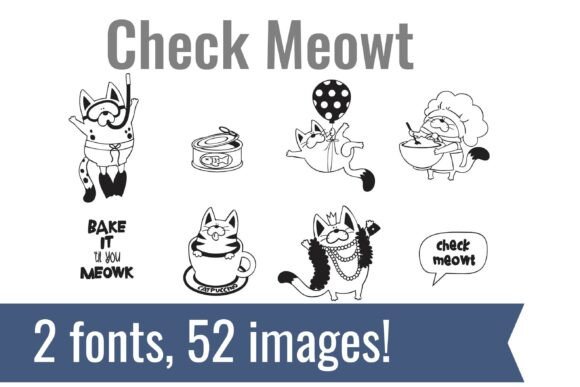
The Check Meowt Dingbats bundle consists of two distinct but perfectly coordinated fonts. The collection focuses heavily on the aesthetic of domestic cats, featuring a variety of poses, expressions, and cat-related imagery. Additionally, the set includes "lucky" motifs, such as horseshoes and clovers, which complement the feline designs. By offering two separate fonts, the bundle provides a wider variety of images while maintaining a consistent artistic style across both files.
Who Benefits from This Collection?
While this bundle is versatile, it is particularly beneficial for specific user groups. If your work involves creating products or gifts for cat enthusiasts, this tool streamlines the design process significantly.
- Paper Crafters and Card Makers: For those creating handmade greeting cards, invitations, or scrapbook layouts, the ability to type a letter and instantly generate a matching graphic (such as a cat in a Santa hat or a cat with a shamrock) saves considerable time.
- Planner and Journal Decorators: Users of digital planners or bullet journals often need small, uniform icons to mark dates or categories. The cohesive nature of these dingbats ensures that the visual style remains consistent throughout the planner.
- Vinyl Cutting Enthusiasts: Machines like Cricut or Silhouette require vector paths to cut designs. Since fonts are inherently vector-based, Check Meowt Dingbats provides ready-to-cut shapes without the need to trace or convert raster images.
Evaluating the Benefits and Tradeoffs
When selecting design assets, it is important to weigh the benefits against potential limitations. The primary benefit of this bundle is efficiency. You gain access to dozens of pre-made, cohesive designs instantly. Because the images are coordinated, you avoid the "mismatched" look that can occur when sourcing icons from different creators.
However, there are tradeoffs to consider. Dingbat fonts are rigid in terms of customization. Unlike a layered vector file (such as an SVG with separate layers for eyes, fur, and accessories), a dingbat image is a single solid shape. You cannot easily change the color of a cat’s eyes without altering the entire image, nor can you remove a specific element of the design. If your project requires deep customization or deconstruction of the graphic, a standard vector illustration pack may be a better fit than Check Meowt Dingbats.
Practical Considerations for Implementation
Integrating dingbat fonts into your workflow requires a basic understanding of font management. Once installed, the fonts will appear in your software's font list. To view which letter corresponds to which image, you typically need to view the font map or "glyphs" panel in your design software (such as Adobe Illustrator, Photoshop, or even Microsoft Word).
It is also important to consider the color limitation. Standard dingbat fonts print in a single color (usually black). To achieve a multi-colored look, you would need to use a software feature like "Image Trace" to convert the letter into a shape, and then manually color the different sections. This adds a step to the workflow but allows for greater creative freedom.
Scenarios for Strong Fit
Check Meowt Dingbats is a strong fit for creators who value speed and consistency over infinite editability. If you are producing merchandise for a craft fair—such as cat-themed tote bags, mugs, or stickers—this font bundle allows you to rapidly generate a wide variety of designs that look like they belong in the same collection. It is also ideal for educators creating classroom materials with a cute, animal-friendly theme.
When to Consider Alternatives
If your design needs go beyond simple silhouettes or single-color icons, you might explore alternatives. For example, if you require photorealistic images or highly detailed, multi-colored illustrations, a stock photo subscription or a detailed vector illustration pack would be superior. Furthermore, if you require specific breed representations that might not be included in this generic "cat" set, a custom illustration commission might be necessary.
Conclusion
The Check Meowt Dingbats bundle serves as a practical, efficient tool for designers and crafters who frequently utilize cat and lucky-themed graphics. By converting complex images into simple keystrokes, it removes the friction of sourcing and resizing icons. While it lacks the editability of complex vector files, its ease of use and cohesive style make it a valuable asset for paper crafts, planners, and vinyl projects. When deciding if this product is right for you, consider whether your workflow prioritizes speed and consistency, and whether the specific artistic style of the cats matches your creative vision.